 Data
Set panel (print
topic)
Data
Set panel (print
topic)
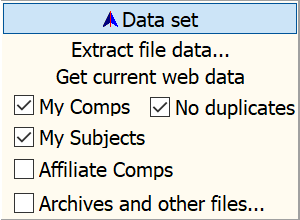
Grunt checks for new data in the background on startup. You can also manually trigger that processes without restarting Grunt. Use the check boxes to select the records to use for the data set.
Extract file data… if it’s not already doing so, starts GruntExtract.EXE to retriev missing, new, or changed data from your XML files. Grunt will WAIT for the new/updated records to be loaded and start running the photo extraction program in the background while your continue working. It may take a little time before you can see photos of newly added property records.
Get current web data attempts to download the latest data and photos from other appraisers you affiliate with over UADNet.com.
My Comps checkbox: Include records for properties that appear as comparable sales in my grids.
No duplicates checkbox: Only show the most recent record of a comparable sale. Grunt retrieves both subject and sale data from your files, and you may not want to see all of it. Duplicates can be caused by encountering multiple revisions of appraisals or using a comparable in multiple appraisals.
My Subjects checkbox: Include records for my subject properties.
Affiliates checkbox: Include records of my affiliates.
Archives and other files... will open the Additional Data sources Dialog to set which other files you want included in your record set. See Record Merge Priority.
About Affiliates:
 Affiliates are
appraisers that agree to exchange data across UADNet.com. If
either affiliate terminates their affiliation or is no longer an
active member of UADNet.com, neither party will receive updates
from the other. Terminating an affiliation does not remove any
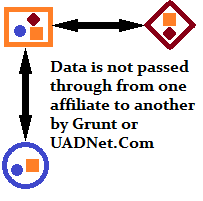
data previously shared. Data is not passed through from one
affiliate to another by either Grunt or UADNet.com. Affiliates are
added and removed using the
Affiliates Editor.
Affiliates are
appraisers that agree to exchange data across UADNet.com. If
either affiliate terminates their affiliation or is no longer an
active member of UADNet.com, neither party will receive updates
from the other. Terminating an affiliation does not remove any
data previously shared. Data is not passed through from one
affiliate to another by either Grunt or UADNet.com. Affiliates are
added and removed using the
Affiliates Editor.